Hi Community … I hope helps
1- Feature name
Options to limit password viewing
2- Feature function
-
1 What will this feature do differently?
This feature brings together the following features:- Limit Search History at Bitwarden case 1
- Add option to hide passwords from general search case 2
- Archive accounts case 3
-
2 - But… what is the “Options to limit password viewing” feature?
- You can have more security with search limiting, basically you hide filters, tags and folders by clicking ‘hide filters, tags and folders’ button - “low security level”
- You can archive your passwords in the ‘archive’ folder, this prevents the password from being searched - “medium security level”
- If you want more security, you can create a list of allowed and disallowed keywords to limit which passwords will be searched and which passwords will not be searched… - “high security level”
-
3 - What benefits will this feature bring?
- It gathers all the necessary resources to increase the security of organizations, people, users.
- “More security for users, organizations that use Bitwarden”
- “This allows users to hide things”
ui/ux
Case 1 - display folders, filters: false

Case 1.1 - result if display folders, filters: false

Case 1.2.1 - display folders, filters: true
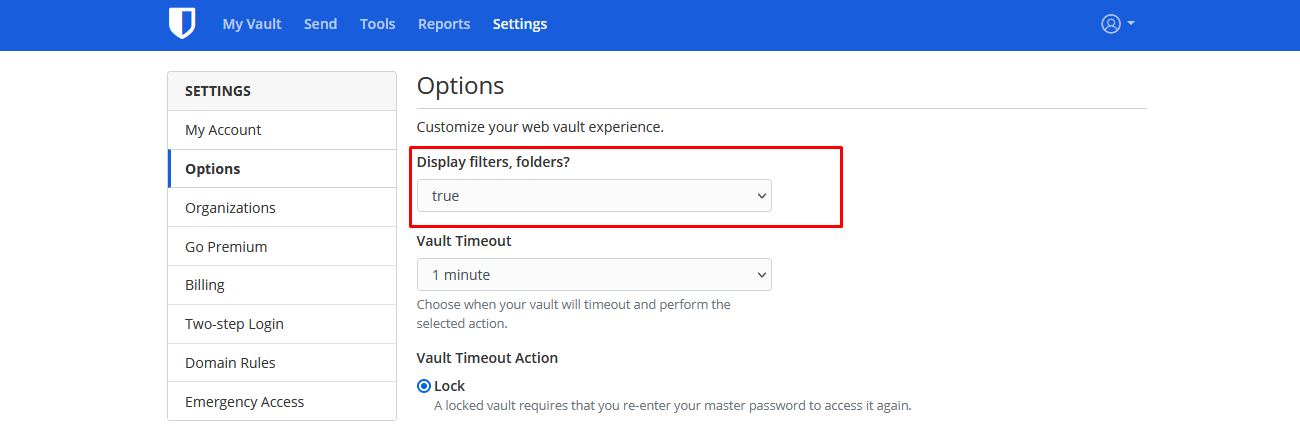
Case 1.2.2 - result if display folders, filters: true

Case 2 - Add option to hide passwords from general search - options

Case 2.1 - Add option to hide passwords from general search - whitelist

Notes
- Case 2.1: You can only search these words as [‘account1’ or ‘account2’ or ‘account3’], the rest are ignorant of the search field - passwords will not be shown
Case 2.2 - Add option to hide passwords from general search - blacklist

Notes
- Case 2.2: You can’t search for things like these words as [ ‘account1’ or ‘account2’ or ‘account3’], these words preclude the search. That is, these accounts with these words are hidden from the search field.
case 3 - Archive old accounts

Notes
- Case 3: Here is the folder where the accounts are archived
More notes
1 - Database and rules to help:
- Feature name: Limit Search History at Bitwarden - type: “Boolean: true|false”
- Feature name: Add option to hide passwords from general search - type: “LONGTEXT”
- Feature name: Archive old-accounts - type: “Boolean: true|false"
2 - API - “Application Programming Interface”
"https://api.bitwarden.com/account/resource/keyword/allow"- return json with array"https://api.bitwarden.com/account/resource/keyword/unallowed"- return json with array"https://api.bitwarden.com/account/resource/archive/type/"- true/false"https://api.bitwarden.com/account/resource/display/type/type/"- true/false
3 - API with sample
"https://api.bitwarden.com/account/resource/keyword/allow"or"https://api.bitwarden.com/account/resource/keyword/unallowed"or"https://api.bitwarden.com/account/resource/archive/true"or"https://api.bitwarden.com/account/resource/archive/false"or"https://api.bitwarden.com/account/resource/display/folders/true"or"https://api.bitwarden.com/account/resource/display/filters/true"or"https://api.bitwarden.com/account/resource/display/folders/false"or"https://api.bitwarden.com/account/resource/display/filters/false"or
4 - Samples with API - “Application Programming Interface”:
sample 1: "https://api.bitwarden.com/account/resource/keyword/allow" return json with array
keywords: [
    {
        "keyword": "account1",
    },
    {
        "keyword": "account2"
    },
    {
        "keyword": "account3"
    }
]
sample 2: "https://api.bitwarden.com/account/resource/keyword/unallowed" return json with array
keywords: [
    {
        "keyword": "account1",
    },
    {
        "keyword": "account2"
    },
    {
        "keyword": "account3"
    }
]
5. More, more notes
- These features have not been implemented to the best of my knowledge, here is just a rough draft, concept and initial idea
- My goal is to help the Bitwarden community
- Initial considerations in case 2:
- If you have a keyword dictionary it is possible to hide your passwords from the search.
- For example, in computer networks if you do not want to allow certain ips to access a page you have a list called blacklist, this list is a plain text list that provides a list of ips or a range of ips that will not access the website
- This blacklist is conceptually called the list of disallowed keywords…
- So… “Whitelist” is the list of allowed keywords and disallowed keywords is “blacklist”
- Search engines use a file called robots.txt that tells the browser or google crawler whether to search for certain words or not.
6. References
- Bitwarden Public API | Bitwarden
- Archive old accounts
- Add option to hide passwords from general search
- https://www.cloudflare.com/learning/bots/what-is-robots.txt
- CTI is Now New Era Technology - Managed Services - Networking - Voice
- Blacklist (computing) - Wikipedia
- https://www.esecurityplanet.com/applications/whitelisting-vs-blacklisting-which-is-better/
- https://www.mpwrsource.com/en/squad-stories/white_blacklisting