When I am creating a new account on a Web site that limits the number of characters, or doesn’t allow special characters for the password, the suggested password will have too many characters, or will include special characters which the idiots at the Web site don’t allow..I have my default selection in bitwarden for passwords to be of 21 characters, with special characters.
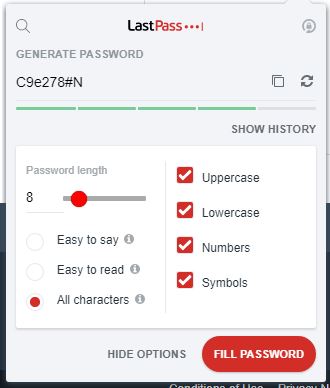
In Lastpass, I could change the password by reducing the characters, or removing special characters, AT THE NEW PASSWORD FIELD. I did not have to stop what I was doing, go into the password manager, change the type of default password I wanted to use, apply that, make a selection of the new password, and then go back into my password manager and undo all of that nonsense.
Since lastpass has been around for over ten years with that feature, I can’t imagine why your developers would not have included it. Please fix this oversight.
Additionally to @grb’s suggested workflow (which I also prefer), there is an alternative workflow that might not be what you had in mind, but is probably not so far away either.
sThough, there is one thing that is definitely not implemented yet: the ability to filter special characters in the generator. There is an existing feature request for that: Filter special characters in generated passwords per login [Edit: filtering specific characters seems to be irrelevant to OP.]
Apart from that, you now already could use the inline autofill generator as well, which is based on the inline autofill menu (which you have to enable first) and which “starts” on the password field:
1. When you click in a password field, you get suggested generated password, based on your general generator settings in the browser extension, which you can click:
4. Then, the “New Login” window of the browser extension opens and you can use the generator again to change the generated password again, fill in other details for the login item, and “Save” it.
@Bandit Did you see my alternative workflow as well? It doesn’t open the generator right below the field - but in the BW popup window that opens in the flow, as I wrote, you can make use of the generator there.
Other than that: there is another feature request that didn’t mention the generator right now, but entertains a related idea, I think (which is: to “pull” functions from the extension window “into/near to” the login fields / bring them to the inline autofill menu): Make the inline autofill menu like the browser extensions itself (look, feel, usage...)
PS to clarify: the words “pull” and “bring” were an analogy here – I never intended to imply those functions should be removed in the original place. Maybe I should have written “duplicate” to make that more clear?
You condensed my statement to such a high degree I can’t respond with any context.
Perhaps if you watched a video showing a user creating credentials with lastpass where the web site requires they either increase or decrease the number of characters, add or remove numerals, or add or remove special characters.
I think that is the best way for you to see the workflow.
Once you do that, if you care to, then we can have an exchange with the clear understanding of how lastpass does all of that at the two fields the user is trying to fill.
Nail, I took pains to be clear about exactly what I was describing. I work in tech, and understand exactly how to express such things.
I think you’re confusing your inability to conceptualize what I described with a poor description on my part.I say that with no sarcasm.
As I stated previously, the situation I’m referring to is specifically one in which the developers do not allow the number of characters in my default bitwarden supplied password when creating a new account. The same goes for their not allowing special characters which are always part of my default password for a new account.
In that circumstance, had I been using lastpass, I would have been able to modify my password to meet their idiotic requirements right there, and then, as the image shows.
I’m NOT talking about rewriting bitwarden so that the browser flyout is eliminated, and replaced with what lastpass provides at the username, and password fields, despite that obviously being a simpler, and more intuitive interface.
As to your suggestion. I would think it obvious that I have used both workflows as I mentioned how lastpass works, and I am currently using bitwarden.
Lastly, I have to correct you in that this request is, as I have mentioned a couple times, about one request, not two.
Well, until reading the above, that would have been my best guess at what you might be asking for that doesn’t already exist. Therefore, I now have not the faintest idea what your proposal may be about.
I wish you the best of luck with your feature request!
Both shown workflows also allow to modify the generated password again. In other words: that part is already implemented.
That would also have been my best guess (especially since your title specifically complains it wouldn’t be possible at the field) – but since you excluded every other interpretation as well, seemingly, I now also have absolutely no idea what you are requesting here.
PS: No one ever suggested here that any current function of Bitwarden should be eliminated.
This topic has been scheduled to be automatically closed in a month. If, before that time, the details of the proposed feature are articulated in a way that can be clearly understood (and if the feature request is not a duplicate of any existing requests), then mods will delete the automatic timer and leave the thread open for discussion and voting.
I understand your confusion. I have experienced it many times when the conclusion I had drawn as to what the narrative was underlying a person’s writing, whatever the category, and then had to pivot to a different understanding, and essentially start from scratch in forming my response.
To help I’ll start with a repost of what I had written with clarification.
As I stated previously, the situation I’m referring to is specifically one in which the developers do not allow the number of characters in my default bitwarden supplied password when creating a new account. The same goes for their not allowing special characters which are always part of my default password for a new account.
In that circumstance, had I been using lastpass, I would have been able to modify my password to meet their idiotic requirements right there, and then, as the image shows
I would start there, and then watch a video of someone using lastpass in the specific circumstance where the Web site did not accept the default password, and required the user to reduce the number of characters, or remove or add special characters or numerals.
What you’ll see in lastpass is that the controls to make that change appear at the password field, not in a flyout in the upper right corner of the browser as it does in bitwarden.
Allow me to reiterate that the only circumstance under which I want a change to bitwarden is specifically the one in which the web site rejects the default password for a new account because it contains too many, or too few characters; contains special characters, or does or does not contain numerals.
In lastpass the interface for making those adjustments are presented to the user, just as in bitwarden, but lastpass does it right at the password field.
If you’re a long term user of bitwarden, this might seem like a silly complaint. If you were a long term user of lastpass, as am I, it’s a step backwards. This is the perspective that I seem to be struggling with the most to present.
Because the image that you posted is cropped, it unfortunately does not show when and where this UI element appears, which is why I had previously asked you to clarify the following:
You’ve made the following suggestion at least twice:
Unfortunately, you have not linked any such video, and a Google search turns up nothing of relevance. If this video is required viewing for understanding your feature request, then please provide a link.
You also wrote the following:
However, in the above discussion, you have repeatedly been asked if you wish for Bitwarden to show password generator controls along with the “Fill generated password” pop-up right at the password field, and each time, you have protested that this is NOT what you are talking about. This is why no one can make heads or tails of your feature request.
Despite my ongoing confusion, I do want to thank @Bandit for inspiring me to mess around with the inline password manager and realize that there is an intuitive way (at least to me) that it could be made much more flexible. As such, I opened a feature request, Open full generator from Inline generator. If you feel it would be helpful, go vote for it.
I will clarify. I don’t think you’re quoting what others posted in a way that accurately represents what they were asking me.
All of the responses were based upon moving what already exists, whereas I was asking for an expansion of features for what is presented at the password field. I was not requesting that the generator appear at the password field instead of in the upper right corner of the browser. Keep that, it’s fine. But instead take what is offered at the password field and expand it’s options to match what lastpass offers.
Those who like the way bitwarden works would not suffer a change to the interface they didn’t want, should they wish to keep using the fly-out in the upper right corner. Those of us used to the convenience of the controls at the password field offered by lastpass - change the number of characters, add/remove special characters, add/remove numerals all because the Web site had special requirements for passwords that did not match our default passwords, could make that change on the fly.