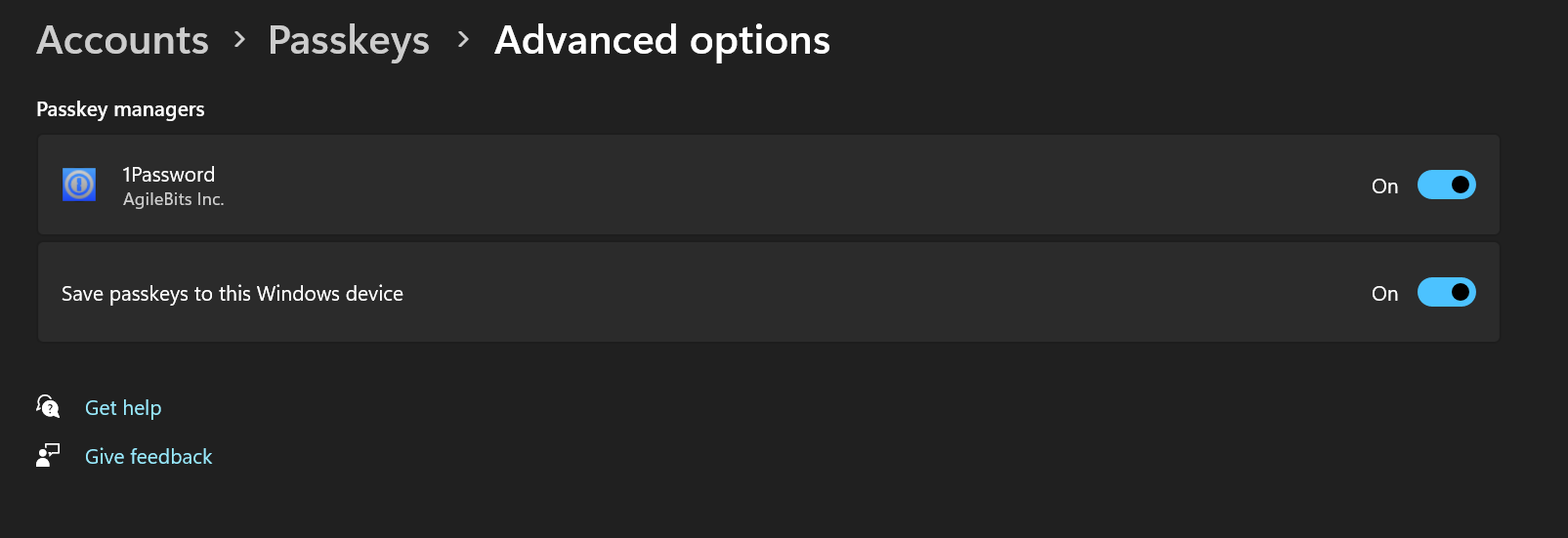
Does Bitwarden have plans to support this in the near term? That would be really neat, because I feel like lack syncability of passkeys across platforms is a major issue that needs to be solved for it to really take off as a viable alternative to passwords.
Ugh, reading the Microsoft documentation for this feature makes me fear that the passkey UX will become even worse than it already is. Now, instead of the Bitwarden browser extension being able to directly intercept passkey creation/authorization requests, we would have to first click through a “Windows Security” prompt.
Also, Windows will now force the User Verification to be done using Windows Hello, instead of allowing the third-party passkey manager to implement a User Verification method for passkeys stored there.
All that was really needed is a way to disable all passkey handling by the Windows OS, so that we could skip all of the unnecessary “Windows Security” prompts (when using Yubikeys, for example). Instead, what seems to have been developed is a framework for inserting even more Windows OS hooks into the handling of passkeys by other parties.
You’re able to use them in the browser, yes, but if Bitwarden were to use the passkeys API in Windows they could also be used to authenticate in other apps.
And small glimpses also here, beginning at around 10:00: “Passkeys on Windows: Paving the Way to a Frictionless Future!” by Sushma K, Principal Program Manager, Microsoft and Ritesh Kumar, Software Engineer, Microsoft: https://www.youtube.com/watch?v=tZFs6Hhqxz0
PS: Also in those videos, they (MS) spoke of “launch sometime early in 2025” - but I haven’t seen anything new to that…
Petri cites their source in the very first sentence: " Microsoft has announced that it’s expanding support for passkeys in Windows 11." That link (same one @Nail1684 cited earlier) is a Microsoft site that mentions with whom they are working.
A quick followup to this: Microsoft included this change in Release Preview channel, and maybe it will be rolled out to everyone in the next Patch Tuesday update.
[Passkeys]New! A seamless plugin passkey provider integration in Windows 11. You can now use plugin credential manager for passkeys. To set up a plugin credential manager, go to Settings > Accounts > Passkeys > Advanced options. Turn on support and complete user verification using Windows Hello (through face recognition, fingerprint, or PIN). Once verified, you can use your existing passkeys saved to the plugin credential manager or save new passkeys.
More detailed information about the “plugin passkey provider integration” is available here:
From an initial read, the main functionality is that this allows Windows Hello (biometrics or PIN) to be used for user verification when using passkeys stored in a third-party password manager. It is not clear whether passkeys that were created and verified using Windows Hello on one device will be usable on any other device (the passkeys themselves may be syncable, but the biometric data used by Windows Hello will always stay on the local device).
I think there is a similar integration possible (or planned) for MacOS - but I don’t know if there is anything similar for Linux. – And interesting to see, if Linux will remain without UV or if Bitwarden has to develop an own UV for Linux.
I wonder if this may be forcing bitwarden into this api because latest 25h2 windows 11 update no longer allows bitwarden to intercept passkey setup on websites (at least on firefox) making it as far as I can tell impossible to create passkeys via the browser extension.
Yeah, I spoke too soon and was wrong. I tried setting up a passkey for OVH and they do something weird that doesn’t work for bitwarden. Thanks for the clarification.