Bitwarden on Mac OS 15 laptop, Chrome and Safari browsers, biometric unlock not working. Is this how it is for now or have I not correctly enabled this feature?
If you mean by “biometric unlock not working” that you can’t unlock the Chrome and Safari extensions at all with biometrics, then that is not how it should be.
Thanks for this information. I am following instructions. It seems that the browser extensions want the main desktop Bitwarden application open. All very confusing. Browser app, main desktop Bitwarden application, and the Bitwarden website account log in. I have enabled Biometric Unlock for the browser but the extension never works that way. I log in only by entering a password.
Yep, you need the Bitwarden desktop app for biometric unlock. (PS: and on MacOS it has to be the App Store “version” of the desktop app)
You have to activate biometric unlock for the desktop app itself to work – and don’t forget to also turn on “Allow browser integration” in the desktop app settings.
When that is set up, you can activate biometric unlock for the browser extensions.
From my own experience, I would do this step by step. And if it doesn’t work: lock all apps, unlock them again, and proceed…
Maybe I misunderstand you here now, but of course you have to be logged in on the desktop app and browser extension – but you don’t have to be logged in to the Bitwarden web vault / web app for biometric unlock to work.
Hm. When you have a habit of logging out on the browser extension, then you always have to login again. – Unlocking (!) can only work, when you don’t log out but only lock the browser extension. (More on the difference between logging in and unlocking here: https://bitwarden.com/help/understand-log-in-vs-unlock/)
What are you vault timeout settings in the browser extension (Settings → Account security → Vault timeout)? – Make sure the timeout action is set to “Lock”.
PS: For your Chrome browser, this would also be relevant on MacOS:
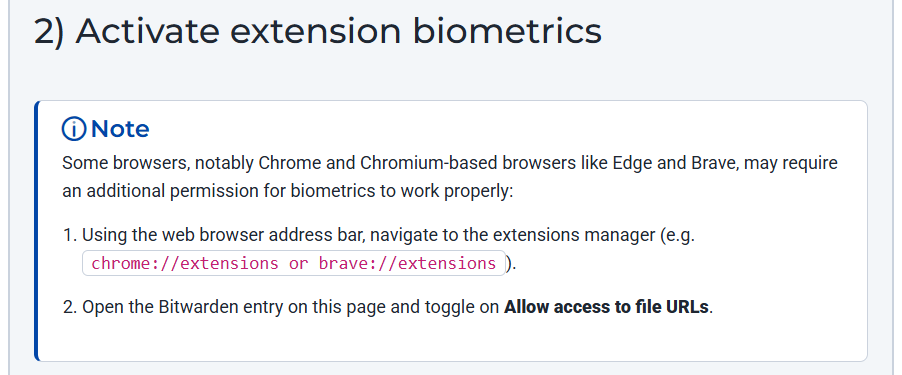
(–> https://bitwarden.com/help/biometrics/#2-activate-extension-biometrics)
I have posted here previously but if you’re looking for biometrics to work on Safari in unison with the desktop app, that does not work very well at all at the moment.
I did manage to get so other browsers working without problem.
This issue is apparently being worked on but now I have set a complex pin to use with Safari
All the best
1 Like
Thanks for this information.
I wish to politely note that I can’t get the biometrics to work on a Mac OS, Chrome browser. I have gone into the Desktop application for Bitwarden, and repeatedly checked the box to allow biometrics, then when I return to the browser app, then check off all the correct boxes in the browser app, the settings I give it do not stick. When I hit the Back arrow to return to the App main window, then go back into Security, the check boxes are unchecked. Yes, I clicked SAVE. — Thanks so much for your kind technical advice.
Can you successfully unlock the desktop app with biometrics?
What is your desktop app version?
What is your BW extension version on Chrome?
-
Yes. Desktop unlocks using biometrics.
-
Version 2025.10.0 (48758)
-
Version: 2025.11.0
SDK: ‘main (8ef7951)’
Server version: 2025.11.0
Good! But then, first, I would recommend to update your BW desktop app to version 2025.11.1.
After you updated the desktop app – and made sure that biometric unlock still works there and “Allow browser integration” is still enabled – I would deinstall and reinstall the Chrome browser extension.
Then, try to reactivate biometrics on the Chrome extension – and make sure that the desktop app is running/open and you’re logged in (locked or unlocked). Wait for the desktop app to “react” and make sure you “allow” all needed permissions (e.g. also Allow access to file URLs).
PS: Here an example where deinstalls/reinstalls worked, though I think usually it shouldn’t be necessary to also reinstall Chrome itself…
@FixMacs An important addition for it to work:
When you set it up, the desktop app must always be running first, before you even open the browser with the respective browser extension. Otherwise the extension can’t initiate the biometric unlock.
Sounds complicated, but it isn’t: just set the desktop app to start also on system start – that way the desktop app is always initialized first and you don’t even run into that problem.
That option would be in the desktop app settings:

So, the browser extension biometric unlock will not work unless the Bitwarden desktop application is open and launched before opening the browser extension. Is that correct? The browser extension can be unlocked using the password without the desktop application running, but the extension will not open with biometrics until the desktop application is running.
Yes, the Desktop app must be running in the background and logged in. The Desktop app window does not have to be open, and the app does not need to be unlocked.
(emphasis my edit)
Well, to be absolutely precise: No, not exactly.
The browser extension biometric unlock will not work unless the Bitwarden desktop application is open and launched before opening the browser, which “has” the browser extension you want to use.
Yes.
Yes, you can’t unlock the extension until the desktop app is running. Or more precise, as stated above, the desktop app must be running before you even open the browser, which has the browser extension you want to use. Otherwise, you can’t unlock the extension with biometrics.
You have deep knowledge of Bitwarden getting in and out. The conditions that allow the browser extension to function are so narrow and replete with a dozen factors that must be met before the thing will work is instructive information. I rarely quit the browser, whereas the Bitwarden browser extension and desktop application are frequently locked. Thus, I must thank you for educating me. The browser extension does not work, is what you are telling me. It doesn’t work under the normal conditions of using a computer with a web browser and an extension. I value Bitwarden itself. I will continue to use Bitwarden, but at last I will put to rest the idea that the biometrics will ever work without quitting and relaunching the browser every hour– a condition to which I prefer to avoid.
1 Like
Why quit the Desktop app, then? It’s easy enough to have it automatically running in the background all the time, which is the primary requirement for biometric unlock to work in the extension.
This should not affect the biometric unlock.
For the record, this is an inaccurate statement.
You may have a point that the initial set-up could perhaps benefit from simplification or automation, but at worst, that is only a one-time ordeal. Many users use biometric unlock for their browser extensions on a daily basis, without problem.
In addition to @grb’s answer I would like to repeat something I wrote before:
… so if you let the desktop app start automatically on system start up – and as long as you don’t close the desktop app manually – this becomes shockingly easy.
You can open and “close” the browser extension as often as you like, and you can open and close the browser as often as you like – biometrics will still work as long as you don’t close the desktop app.
And if you have enabled “Close to tray icon”, then it becomes practically impossible to accidentallly close the Desktop app (as closing the app would require the user to deliberately navigate to File > Quit Bitwarden, or to use the Task Manager to kill the process).
1 Like
I’ve been dealing with the same issue. Thankfully, this thread gives a great overview of this issue and its solution. Respectfully, I have to agree with @FixMacs ‘s sentiment. This feels like such an awkward setup - “make sure to have the App running before you start the browser, if you want the biometrics functionality on the extension to work”. And not like once, during install/setup, but every. single. time. Basically, I have to run both your app on the machine and your extension on my browser (of the same machine) to make use of its full capability. What’s the point of the extension then, if i can just switch to the App (that’s running in the bg) and grab my stuff from there? This is a rhetorical question. The design seems clumsy and awkward. I hope at least that the reasoning for this is some smart and secure way of handling this auth data. Good luck in your future endeavors! Just a note - not everyone likes having 321321 apps and tools running at the same time on our machines. And an extension should work isolated only in the browser, and not depend on another sister-app running on the same machine. It makes it feel a bit redundant. What’s the benefit in this case, compared to the BW App - autofill?
@crisrss Welcome to the forum!
As far as I know, browser extensions simply don’t have the necessary permissions to access biometrics themselves, therefore the “bridge” to the desktop app is needed. (browser extensions are restricted by the browsers, and are limited in their direct interaction with OS functions like biometrics)