Regarding pin security, it’s also worth mentioning that there are brute force protections in place:
When using a PIN, you will be automatically logged out after five failed attempts at entering the PIN.
Regarding pin security, it’s also worth mentioning that there are brute force protections in place:
When using a PIN, you will be automatically logged out after five failed attempts at entering the PIN.
While the explanation is detailed and surely appreciated by many, it is absurd that the developers would make such a major change without giving users the choice to continue using biometrics on restart. As you and others have pointed out, every user’s appetite for risk is different. Since biometric unlock on restart can be considered less secure but not inherently insecure, I could understand disabling it by default and showing a warning if someone turns it back on, but removing the option entirely is unreasonable.
This change makes the workflow unnecessarily cumbersome, and arguably even less secure. I now have to unlock my desktop app every time Windows starts just to use biometric unlock in the browser extension. That means leaving the desktop app unlocked for at least a short period.
I’ve been a huge fan of Bitwarden, but forcing me to type my password every time without the option to choose otherwise is a frustrating step backward. Unless this is addressed, I’ll be looking at alternatives. What a shame.
Yes, but for full disclosure, this will only thwart a curious bystander, or an unsophisticated attacker. An attacker with some technical knowledge will simply exfiltrate the encrypted vault cache and the PIN-protected keys, and then carry out an off-line attack that will not be encumbered by any rate limiting or maximum attempt limits.
I would, in fact, consider it “inherently insecure”, similar to setting a vault timeout of “Never”. On the other hand, Bitwarden does allow the “Never” lock option, so you could argue that it should also allow biometric unlock on app restart.
However, I believe that part of the problem that led to this change was that the biometric unlock on app restart did not work reliably (leading to authentication failures), due to a Windows bug. Having product features that don’t work consistently can negatively affect Bitwarden’s reputation, so it would be their prerogative to eliminate features that are buggy.
I think you’ve hit the core point. I think more than security perspective, the issue is regarding the feature not working consistently.
I agree wholeheartedly!
I was very surprised that it wasn’t my motherboard update that led to the changed behavior and started reinstalling at lot of things until I found this thread.
It feels to me like a big overreach of some devs wanting to force their understanding of security on all users. While it feels to me much more insecure, typing the password, while people or keyloggers could watch…
It would be great if the decision to not give the user the choice of using the fingerprint/”Windows Hello” login could be reevaluated.
I can’t agree more with Mark_Haase.
Trying to be more clever than the local admin unfortunately often leads to major f***ups.
This time the person responsible for the decision to deprecate has caused to our company a bigger f***up in form of the data loss than would be approving the risk temporarily. Hypothetical risks usually don’t end up with 10 % of personnel losing their personal passwords because of an update while noone at the company is practically at fault since we relied on a reliable system.
If anyone wants to deprecate features, than this has to be followed with utmost care, multiple rounds of warnings have to be issued via multiple channels (web, app, mail 1, mail 2) and the change must be properly scheduled so that the largest institutions have time to respond.
I would kindly like ask you to even roll this change back - we need the data, guys and it’s human to forget passwords.
And honestly: It’s humane to forget passwords if you rely on biometrics for bypass login. I’ll much rather see a hypothetical risk in the logon path to the password manager than a frickin password on a piece of paper glued to the laptop because of all passwords gone and people not trusting the password manager, because last time they tried it, they lost everything.
+1
My main threat model was someone loooking at my passwords, when I’m onsite using my laptop, and sole purpose of using a password manager. Now the only option that eliminates that is typing my master password in, typing a numeric, possibly 4 digit pin (!), or setting lock vault to Never and just locking my laptop. It baffles me why that is configurable, but unlocking with hello is not
This is a misunderstanding I think. The biometrics option we are talking about here does not bypass login. It only can unlock a vault you’re already logged in to. (only if we had passkeys for login in all BW apps we could have a biometric login option – all biometric options that are available at the moment, are just biometric unlock options)
And though I agree to some things you wrote: you should prepare for such a situation for the next time. Because if for whatever other reason there was a log out (it can happen sometimes), you would experience the same kind of problem you described as well.
I’m also curious about how other password managers implement this, and whether they are vulnerable to local attacks or have issues with Windows Hello reliability.
In 1Password, users can use biometric unlock on app start if the enable TPM for Windows Hello. Doing so produces the following warning, which hints at some vulnerabilities (similar to those in pre-2023.4.0 versions of Bitwarden, I think):
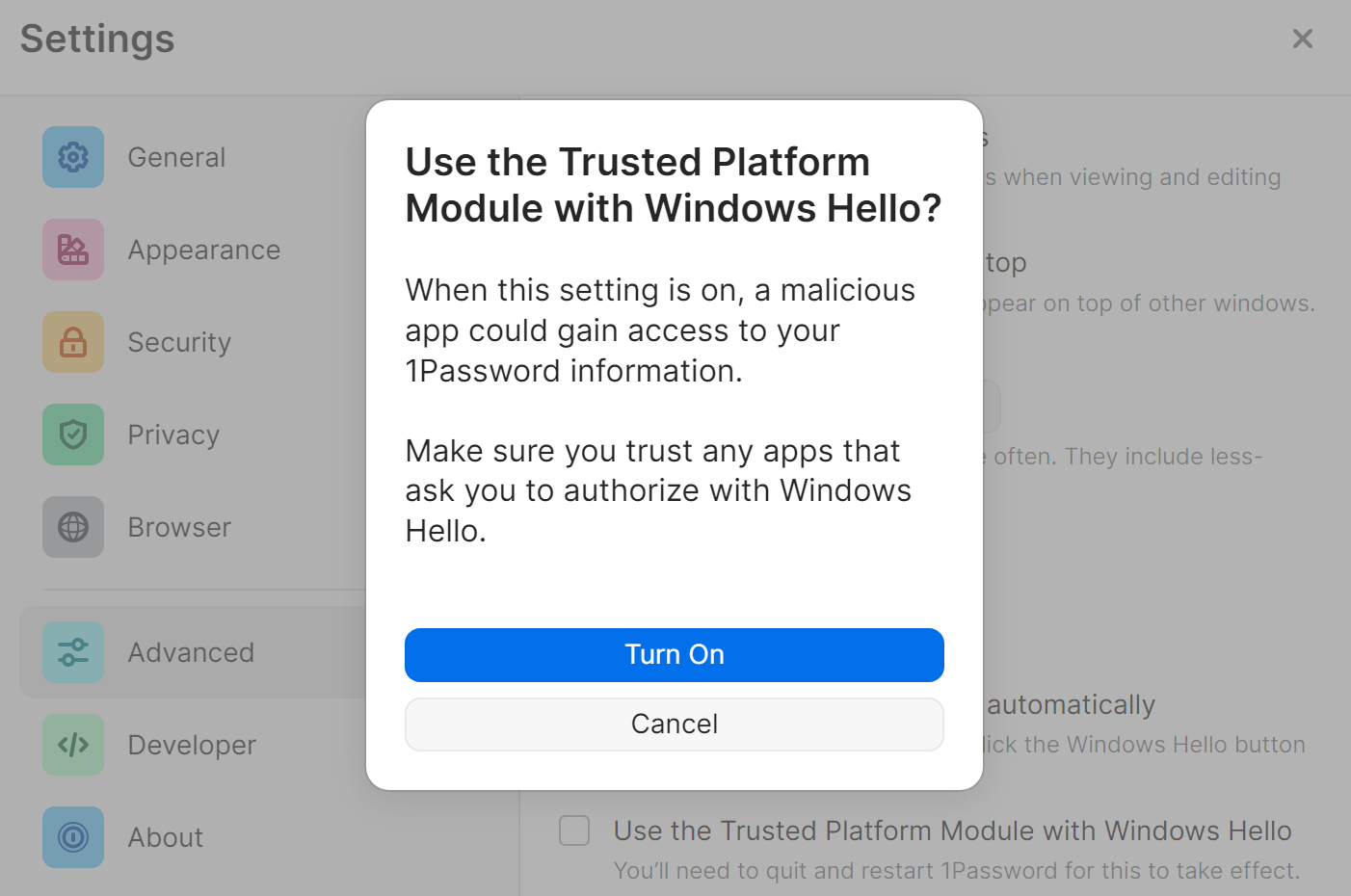
Unfortunately, 1Password is closed-source, so it’s difficult to impossible to find out their implementation details. This Help article may provide additional clues:
That’s exactly my thoughts.
Warn people, maybe change defaults, but don’t remove the option.
I’ve tried many password managers, and Bitwarden was the first one that really felt right for me. But this change makes me seriously consider looking for alternatives again. I’m aware of the risks and I’m willing to accept them.
Mark_Haase’s post perfectly captures the crux of the matter: Bitwarden should trust its users to choose a level of security that balances their needs with convenience.
For my home computer, which only I use, unlocking Bitwarden with Windows Hello fingerprint is absolutely central. In fact, it was the decisive reason I switched to Bitwarden a few years ago.
I kindly ask you to introduce the option to let users decide whether they want to rely on login with Windows Hello alone or not. These settings options could also use the “recommended for higher security” wording.
Thanks for all the clear explanations. So if we were to revert to the previous biometric situation which some times had a focus issue, the security risk would be much lower. Because the previous API actually kept part of the encrypted key.
So if this is the case, I would very gladly revert to the previous method and would accept a glitch of focus every now and then.
Perhaps it goes without saying that I really love Bitwarden and value the development team for all their work.
As far as I remember (from about three years ago, when I interacted with you and Quexten for the first time), 1P has been consistent about their TPM authentication (used to persist the key after the app shuts down). You authenticate, and then you get the secret. No authentication means no decrypting secret (with the authentication requirement bit similar to BW’s two-half implementation, but dissimilar to the current implementation). The problem has always been (the same with BW’s two-half implementation) that any user-space process can prompt the user for authentication, and if the user complies, the process can get the secret needed to decrypt the 1P vault without the 1P app’s involvement, i.e., there is no app-segregated secret retrieval mechanism (available on Mac).
I don’t know for sure, but the “reliability” of 1P with biometrics authentication may stem from authenticating from the app. You don’t trigger biometrics authentication from the extensions; you unlock the app, and the extensions are unlocked automatically (KeePassXC uses the same approach). There is no extension (browser in the foreground) sending a message to the Bitwarden app (app in the background or hidden) prompting for Windows Hello (which absolutely needs to be in the foreground for Face ID). I think there have been people suggesting such an approach for Bitwarden on the forum.
For biometrics authentication not persisting keys to the TPM, I haven’t “re”searched this topic for 1P, but if they can enforce the authenticate/secret-released flow with TPM, they probably can do this with their non-TPM biometrics authentication as well.
I use the Firefox extension. On one of the recent upgrades, Bitwarden has begun requiring the master password every time I start Firefox, even though I’ve specified in the settings that it should use biometrics and should ask for biometrics on launch.
I see that this was an issue several years ago, but my extension has been working just fine until quite recently.
Thanks for any assistance.
So I’ve skimmed through this forum post and also the related defect in GitHub. I still am confused about the change. A very simple article from Bitwarden would be nice explaining the reasoning, why other platforms with Bitwarden seem to be fine with biometric login (no issues on my Android phone for example) with some hints as to what’s going on with FIDO and Microsoft to either improve underlying specs or the OS implementations specifically. I don’t see why we can’t have the old behavior back with an opt-in. Some very obvious functionality was removed whether for good reason or not and a number of people here have commented on how disruptive that is to their workflows. For me it’s an extra 2 minutes since I have to hunt for my intentionally-complex Bitwarden password in my Personal Vault (also protected with Windows Hello), copy and paste it in, clear my copy-paste buffer, close my personal vault (and the related re-synch across other clients that now think they’re out of sync too). It’s extremely annoying and has made my life hell with a password manager I really otherwise love and am happy to pay for with the premium benefits.
This ability to authenticate with biometrics on restart was removed in 2025.8.0 because of the perceived security risk due to new biometrics implementation. People are complaining. Until BW relents (or not), using “Login with Device” may be an (short-term) alernative.
I too have a strong preference for biometric unlock. As much as I don’t care for the current stance, I realize Bitwarden is the one with the corporate reputation to protect and therefore gets to set the minimum-security-level for their product.
Disallowing an ineffective or unreliable security control is understandable, although I do see room for improvement in the messaging. My hope is that Bitwarden is pressuring Microsoft (in as much as that works) to fix their bug so that Bitwarden can restore the prior behavior.
Or, maybe support passkeys for both login and unlock to any device (desktop, extensions, etc.), so I could use YubiKeys as my “fingerprint reader”.
TLDR: rolling back to the previous version allowed me to use Windows Hello on restart again (as opposed to the new update wiping that existing credentialing)
Seeing some sys admins in here angry about this poorly communicated change makes me feel less stupid - I am one that forgot a detail of my master password after a long-time reliance on biometric unlock on both android phone and desktop, and as someone else pointed out, this is human. I always figured one or the other device would be accessible. Well, unfortunately somehow my phone app’s “use biometrics” was inexplicably disabled (presumably by another update) by the time the desktop update rolled out. Thankfully, my long shot of rolling back the desktop app using the previous version on Github worked in allowing me to use Windows Hello again to login on restart and regain access, phew…
@nanocyte Welcome to the forum!
If you don’t want to rely on hope or luck the next time, the only answer to the kind of problems you described is:
regular backups / exports of your Bitwarden vault and
creating (an) emergency sheet(s)
A similar situation for you could have been caused by several other reasons as well.