Unable to unlock Bitwarden desktop app on app start using Windows Hello

And now the original problem has recurred.

The BitWarden version I have is -
Version 2025.8.0
SDK ‘main (29c6158)’
Shell 36.4.0
Renderer 136.0.7103.149
Node 22.15.1
Architecture x64

The o/s is - Windows 11 Pro Version 24H2, Build 26100.4946

The Hello login window pops-up automatically when I start my PC and I can use it to login to my Windows account.
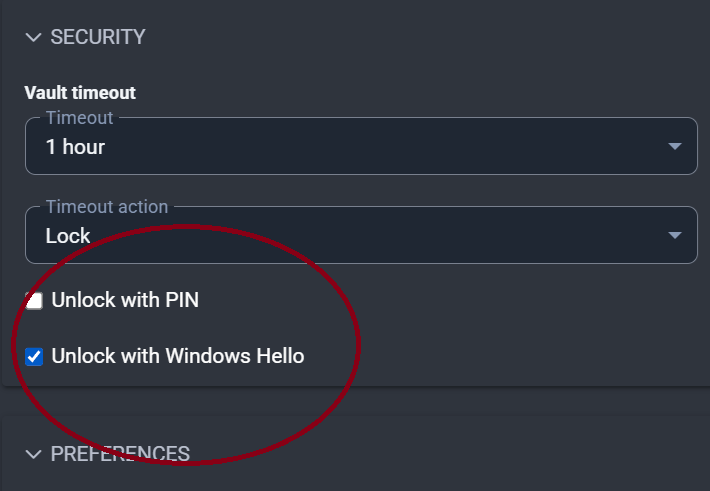
Bitwarden is set to auto-start (which it does) and I have checked the “Unlock with Windows Hello” box in Settings > Security. [The box “Ask for Windows Hello on launch” which used to be part of the Bitwarden Settings is no longer present (when did that disappear?)]

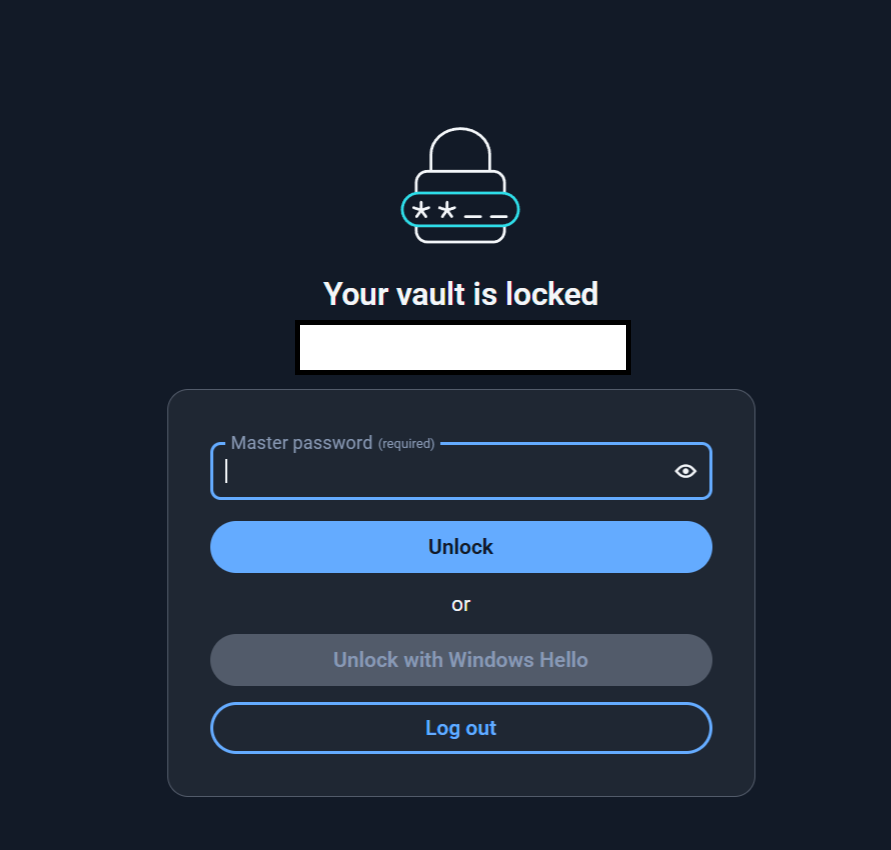
BitWarden does launch automatically but - and this is a BIG change - not only does it not launch the Hello pop-up, the “Unlock with Windows Hello” button is now grayed out and disabled. The only way in is to use my master password.

But then, after logging in to the main desktop app, when I unlock my browser extension for the first time, it DOES launch the Windows Hello login window, and I can use fingerprint recognition to open the extension.

Very strange. Does anyone consider that a complete uninstall, scrub registry, and reinstall afresh would have any benefit? That’s the level I’m thinking of now.
2 Likes

It is now required (v2025.8.0) that you first input the password to unlock on desktop startup.

Removed setting for requiring password or PIN on app-start when using biometric unlock. Password or PIN now always required on Windows and Linux, and never required on macOS.

AFAIK, they had to change the implementation of how the app/extension interacts with Windows Hello to ensure that it shows up in the foreground reliably, resulting in an implementation that requires this step for security.

You can, of course, log out and use “Login with Device” to approve login from your phone.

Wow - thanks for this very prompt and precise reply - much appreciated.

I’d obviously skipped this explanation when searching elsewhere. I didn’t realise it was an intentional baked-in behaviour by BitWarden.

I’ll try some experiments to see which combination of login options fit my workflow best.

Thanks again.

1 Like

I can no longer open by Bitwarden Desktop app (Windows 11) using Windows Hello. I have to type in password every time and only if I keep the app running but locked, I can open it with Windows Hello. Why? What is this? What happened?

This seem to be somehow related to latest updates, since Release Desktop v2025.8.0 · bitwarden/clients · GitHub says:”Removed setting for requiring password or PIN on app-start when using biometric unlock. Password or PIN now always required on Windows”…and in here Bitwarden Desktop App with Windows Hello inconvenient - Ask the Community / Password Manager - Bitwarden Community Forums sayed @grb “Unfortunately, due to a recently discovered encryption vulnerability"…”

But this does NOT explain it. Is this a feature or a bug? If because of security vulnerability, then what vulnerability exactly and how did it affect? Are people who have used Windows Hello in past somehow still vulnerable (leftover files, temp files, etc. still on computer even after this feature was disabled in Bitwarden, etc.)?

I would really like someone to explain this to me…what happened? Why was this done? Where was this documented or explained?

And if there is a way to get it back working with just Windows Hello, how?

PS. Added screencap to point out the issue:”Unlock with Windows Hello” is greyed out, cant be selected/clicked.

10 Likes

Bitwarden’s interactions with Windows Hello/Credential Manager have changed over time. grb’s comment that you pointed out was from June 2024, commenting on the prior implementation. Bitwarden doesn’t publish how these secrets are protected in detail; the details you can often glimpse are from developers’ posts, including this one from Quexten, which you probably have already seen. I think what Quexten said refers to the implementation prior to the current version.

To see the technical details of the implementation of the 2025.8.0+ versions, this PM is probably the most definitive. You would likely get the most accurate information if you dig this up yourself, because as you can see from your previous thread, the developer pretty much stated that what was said in the thread contains many inaccuracies. The Bitwarden users here who help others are unlikely to have access to more information than you do.

As someone who has used Windows Hello to unlock Bitwarden since I could, including the option “Not requiring a password on restart,” I personally would appreciate a summary or even some details you can glimpse from the PM.

1 Like

:face_with_peeking_eye: I cant make anything out of that. :face_with_peeking_eye: Too much talk, too little points. :face_with_peeking_eye:

What I did notice was that the UI has changed and there is no longer similiar options related to starting up and Windows Hello as there where before. So maybe this is just a feature? I dont know.

Under Windows “Control Panel” - “identity management” (or similiar, not english language so I dont whats it called in english) - “Windows identity managements” (or similiar, not english language so I dont whats it called in english) - There is still “Bitwarden_biometric” identification information!!! Why is it there if it cant be used to open the app? This does not make much sense to me!

Its strange that nobody seems to really know and there is no mention about this in changelogs. Being suddently unable to use Windows Hello to open the Bitwarden app is a major change in application. I would like to be told about it and explained. This is just weird. I hope someone can answer what and why is going on. :face_with_bags_under_eyes:

2 Likes

Yes, it’s a feature (or more precisely: it’s a feature that has been intentionally removed).

It’s there — please look at the third bullet point in the Release Notes for version 2025.8.0).

You can still use biometrics to unlock the Desktop app if it is locked but still running.

There was a bug (caused primarily by Microsoft, it seems) that caused Windows Hello to fail if the Windows Hello prompt was not in the foreground, while simultaneously, there were issues preventing Bitwarden from reliably surfacing the Windows Hello prompt to the foreground. Evidently, Bitwarden’s fix to these issues in version 2025.8.0 necessitated the elimination of the option to disable the password/PIN prompts on app restart.

1 Like

That does not actually say Windows Hello is no longer supported to open Bitwarden.

Saying:“Removed setting for requiring password or PIN on app-start”
= This seems to hint about password or PIN feature, not Windows Hello

Saying:“When using biometric unlock.”
= This seems to hint that when using biometric unlock…not Windows Hello opening of the database/app.

Saying:“Password or PIN now always required on Windows”
= This seems to hint that nothing except password or PIN is allowed anymore, but when combined with the above, makes this very hard to understand.

How secure is this? Is the database and all content encrypted and cryptographically tied to the Windows Hello authentication to be successfull? If a malware hits my computer memory when Bitwarden is in that state, can it extract its contents? From our previous discussions I have understod that it could steal the credentials related to Bitwarden account and download the database (which would still be in encrypted format).

I dont like the idea of having to keep Bitwarden app running there all the time just incase I might want to sign into something. Id would rather just open it when needed and the shut it down when browsing in the net etc. something. Using Windows Hello PIN is perfect for this, because it offers quick way to open the whole app securely if needed and keeping it open only when needed.

OK, so we might expect this to be fixed in some point and return “to normal”?

1 Like

Let’s clarify what you were doing (and wish to continue to do). There is no such thing as login with Windows Hello for the Bitwarden Desktop app, so presumably, you were using the “Unlock with Biometrics” option to unlock the Desktop app, which you were leaving in a logged-in state (but possibly closed/not running).

Unless I have completely misunderstood what you are complaining about, I believe that you had disabled the security feature “Require Master Password on Restart”, allowing you to also unlock the Desktop app using Windows Hello when you restart the closed app.

As explained here, disabling “Require Master Password on Restart” weakens the security of your vault data. With such a configuration, an attacker who tricks you into completing a Windows Hello authorization (perhaps when you’re not even trying to access your vault, thereby catching you off-guard) will be easily able to steal and decrypt your vault contents, whether your Desktop app is running or not.

As of version 2025.8.0, to access and decrypt your vault data while the Desktop app is open but locked, an attacker would need to do two things: (1) Trick you into completing a Windows Hello authorization; and (2) Do a memory dump and find the clientKeyHalf. If the Desktop app is closed, then the attacker will be unable to decrypt your vault contents unless they can obtain or guess your master password (or PIN, if you have enabled PIN unlock).

In contrast, as explained above, if you disabled “Require Master Password on Restart” on versions prior to 2025.8.0, then the attacker would only need to trick you into completing a Windows Hello authorization, whether the Desktop app is open or closed during said attack. This would give them full access to your decrypted vault contents.

So, the bottom line is that leaving the version 2025.8.0 Desktop app locked and running in the background (perhaps minimized to the tray icon) is somewhat more secure than keeping a pre-2025.8.0 Desktop app closed and unlocking it with biometrics on each restart.

It does say it: The sentence “Password or PIN now always required on Windows” (which you had trouble understanding) says that when restarting a closed Desktop app, entry of the master password or a PIN is “now always required on Windows”. Clearly, this implies that biometrics is no longer an option for unlocking a Desktop app on restart.

I’m not sure how you meant that, but the desktop app doesn’t have to be unlocked itself to unlock the browser extensions. (i.e. the desktop app can stay locked in the background and makes it still possible to unlock the browser extensions via Windows Hello)

The app is closed, a password will be required on restart as well? Master password is required to decrypt? PIN alone is not adequate?

Per the final parenthetical statement in the sentence that you quoted, a Bitwarden PIN can be used in lieu of a master password to unlock the app on restart:

If I misunderstood your question, please let me know.

No, I haven’t used PIN unlock on desktop for so long that I forgot you can use it to unlock on restart, and I didn’t check before posting the question. :sweat_smile: Thanks.

1 Like

It’s possible, but hopefully you understand the risks: the encryption key will only be protected by the chosen PIN, so you should select your PIN entropy based on your risk-tolerance and the likelihood of a local attack against your device (whether by direct physical access or by malware). By exfiltrating the local vault cache from your device, an attacker can carry out an off-line brute-force attack with no rate-limiting constraints. In case you weren’t aware, on non-mobile devices, the “PIN” can also contain non-numeric characters, so it is essentially an alternative password.

1 Like

Yes, I understand it, and I never recommend anybody use it on desktop/extension (mobile devices are OK for me), at least without a lot of handwaving. Since some malware published by researchers seems to lift Bitwarden’s information, without an accompanied persistent keylogger to log the master password, I have always suspected this is one of the primary ways Bitwarden’s vaults can be compromised. Even if a PIN can be alphanumeric, the word PIN is so ingrained (from the first ATM card) to be numeric that I wouldn’t be surprised if the majority (including myself some of the time) use numeric PINs wherever the word is mentioned.

… not to be pedantic, but alphanumeric personal identification number is a bit unintuitive…

1 Like

Yes, yes.

True. If I get tricked into transmitting Windows Hello authentication. Im pretty sure I wont be.

Seems secure enought.

It does not say it is required on app start. It just sayes its required (without saying where and when), without any mention (that) of Windows Hello (can no longer be used to open locked, but logged-in Bitwarden app).

Side notice:
To be able to access Bitwarden app with simple, yet secure implementation of PIN / Windows Hello / etc, one could simply move onto signing in with passkey (using it also to encrypt the database)? Just save the passkey to Windows TPM magic, therefore using Windows Hello to actually use the passkey. Then just logoff Bitwarden when you are done. And again login when wanting to use Bitwarden again.

Ofcourse for more security, one should use external keys like Yubikey etc.

I recall Bitwarden only supports one passkey to be used for this (signin + encryption of database), which also kinda limits it to one Yubikey / TPM…which in this case does not matter ofcourse.

No this is not accurate. You can store up to 5 passkeys for Login with Passkey (with encryption optionally enabled on each). However, Login with Passkey is currently only supported for the Web Vault app, and requires a PRF compatible browser, operating system, and passkey authenticator.

I guess we’ll have to agree to disagree, although I would think in the context of the preceding sentence (“…password or PIN on app-start when using biometric unlock”), any reasonable reader would understand that the subsequent statement “password or PIN now always required” also refers to “…password or PIN on app-start when using biometric unlock”. Especially as insisting on interpreting the sentence with no context implies that biometric unlock is now never possible (which is clearly not the case).

I would not recommend making decisions about vault security based on anything understood only as “magic”. The TPM probably does not confer as much “magical” protection as you think…

1 Like