You can find the version of your browser extension by clicking on the Settings ( ) icon in the bottom right corner of the browser extension window, scrolling down to the “Other” section, and clicking the About link.
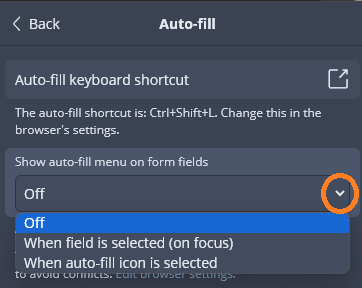
Furthermore, I would suggest that — at least for troubleshooting purposes — you should go to Settings > Auto-fill and use the “V” arrow in the dropdown menu labeled “Show auto-fill menu on form fields”, then select the option “Off”, as shown in the screen shot below:
Finally, I want to ask you to be more specific about what you meant when you said:
Are you saying that you followed the steps in my previous comment exactly, and that when you clicked on the “Auto-fill” link below the item details, you did see the green pop-up box with the confirmation message "  Item auto-filled"?
