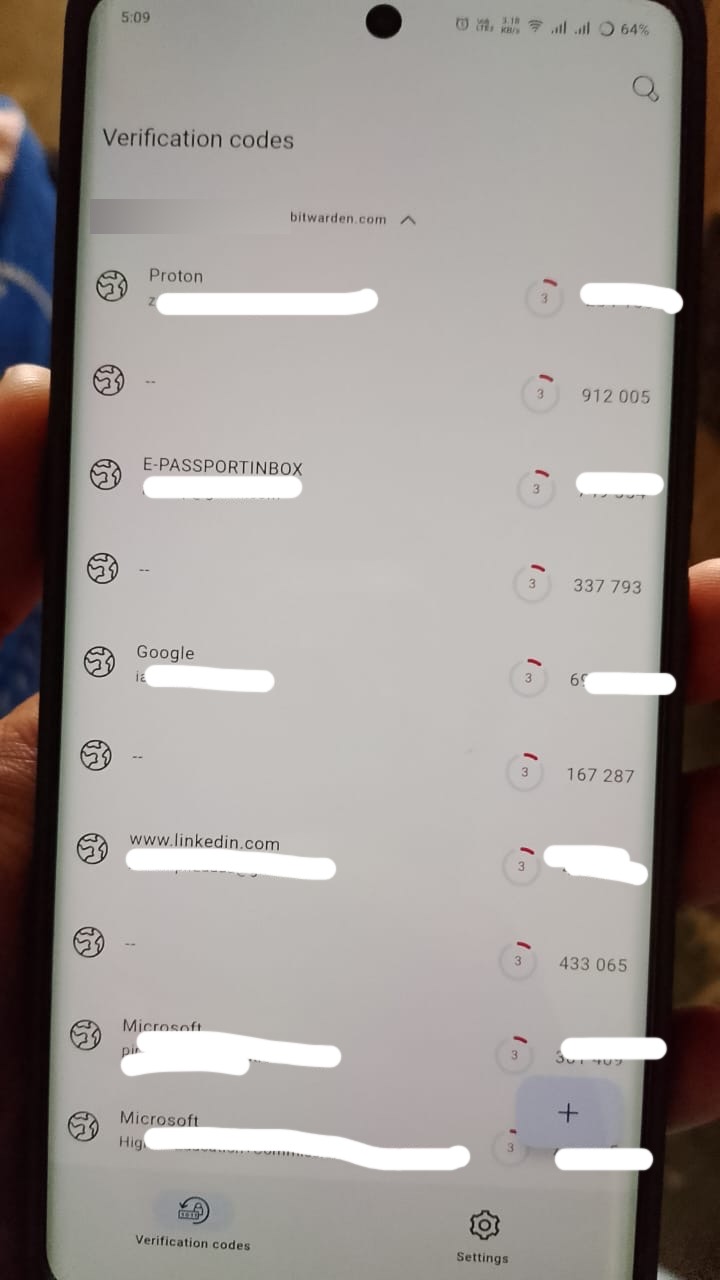
Items imported to Btiwarden Vault from Porton Pass with TOTP secret keys do not have a name when snyced to the Btiwarden Authenticator app
Steps To Reproduce
Import a password export from Proton Pass that contains vault items with TOTP secret keys
Open the Bitwarden Android app
Tap Settings
Tap “Account security”
Enable “Allow Bitwarden Authenticator Syncing”
Expected Result
The Bitwarden Authenticator app entries will have names
Actual Result
The Bitwarden Authenticator app entries does not have names
@Zubair_Ahmed_Pirzada Welcome to the forum!
It seems, your issue is already there as a bug report on GitHub:
opened 03:28AM - 15 Aug 25 UTC
bug
app:authenticator
### Steps To Reproduce
1. Import a password export from Proton Pass that contai… ns vault items with TOTP secret keys
2. Open the Bitwarden Android app
3. Tap Settings
4. Tap "Account security"
5. Enable "Allow Bitwarden Authenticator Syncing"
### Expected Result
The Bitwarden Authenticator app entries will have names
### Actual Result
The Bitwarden Authenticator app entries does not have names
### Screenshots or Videos

### Additional Context
_No response_
### Build Version
2025.7.2 (658)
### What server are you connecting to?
US
### Self-host Server Version
_No response_
### Environment Details
Device: Vivo v40
Operating System: Android 15
### Issue Tracking Info
- [x] I understand that work is tracked outside of Github. A PR will be linked to this issue should one be opened to address it, but Bitwarden doesn't use fields like "assigned", "milestone", or "project" to track progress.
Yes but there’s no any response at GitHub
@Zubair_Ahmed_Pirzada Sometimes it can take some time. Of course, you can also raise this issue here (for awareness, discussion…) - but GitHub is the right place for bug reports.