I want to disable and enable a specific account in a self-hosting service instead of deleting it. May I ask what methods can be achieved?
I’m also not an expert on self-hosting, but if these users are part of an organization that you manage, then you have a few options. For example, there is an available option to temporarily revoke organization membership.
Alternatively, if your organization members are enrolled in the Account Recovery program, then you could reset their master passwords to a value that only you know, effectively locking the member out of their account.
If you get no suitable suggestions here on the forum, you may be able to get a more definitive answer by contacting customer support.
The Bitwarden System Administrator Portal can indeed be deleted, but I just want to disable or restrict logins, not delete the account directly.
Even if I reset the member’s master password, he can still recover the password by himself through his email.
I’m speculating here…
Only this part of @grb’s suggestions included that reset…
… and if I read the documentation correctly, it is implied there, that custom users without the respective permission shouldn’t have the option to execute account recovery:

So, I would think, you can deactivate the option to account recovery for users. (but again, I’m only speculating… don’t know if that really can be revoked after the fact)
Not sure what you mean by this, as Bitwarden does not provide for master password recovery via email. This can only be done from the Admin Console.
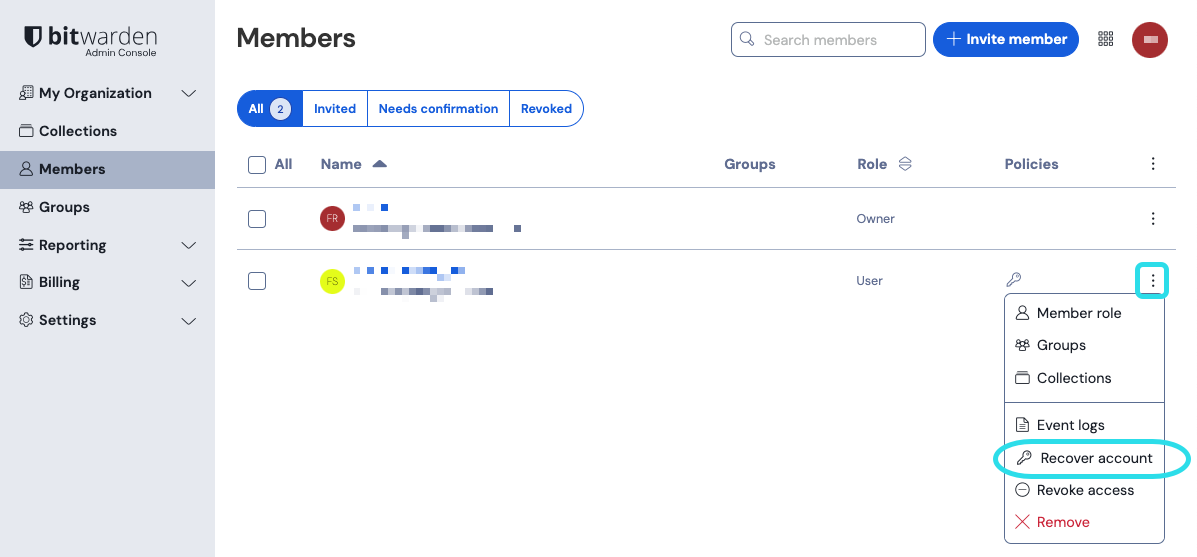
And they can only initiate the account recovery if they are an Admin or Owner (or have been deliberately allowed permissions to manage account recovery); as @Nail1684 has already suggested above, you could revoke special user permissions, or even demote the role of an Admin or Owner to that of a regular user. And even for a user who remains an Admin or Owner, I would assume (but have not verified) that all of their active login sessions are forcibly deauthorized within an hour of the master password change — which means that they wouldn’t be able to access their Admin Console without first logging in with the new master password (which they don’t have).
Also, there is a new Enterprise policy called “Enforce organization ownership” which is available to new Enterprise cloud customers, but will be made available to existing enterprises in the future. This may make the “Revoke” option more workable, since you would also be able to revoke access to the user’s individual vault (called “My Items” under the new policy).
Your welcome, and good luck!