Is there a faster way to log in to my Bitwarden account without using a passkey?
Faster in comparison to what? Typing the master password?
I found that logging out and then using another device for logging in is a bit faster than typing the password which in most cases contains at least one typo. 
2 Likes
Yes, what I meant was that I’m looking for a faster method than typing the master password. I would prefer logging out and using another device to log in, but I don’t have a personal computer. So, I’d like to log in without typing the master password directly, but it seems impossible without passkeys. I guess the best option is to set up a passkey and get Bitwarden Premium
With “another device” I was referring to my smartphone.
On which device do you want to speedup the process? If it is a mobile device, did you activate biometric login?
I actually want to speed things up on PC. On my phone, biometric login is always enabled, but since I don’t have a personal computer, I don’t use the ‘login with device’ feature. As you know, to use it you first need to enter the master password at least once. But once I log in to my account, I usually don’t need to log in to Bitwarden again, so it’s not really an issue
Why are you logging in to your account so frequently that it matters how fast the process is?
The recommended way to use Bitwarden is to configure the Vault Timeout Action to be Lock instead of Logout, and to leave your vault logged in permanently. If you set your apps to lock instead of logging out,t hen you have the options to unlock with a PIN (i.e., a shorter password), or biometrics.
You don’t need Premium to use passkeys in Bitwarden.
1 Like
I use Bitwarden on my office computer, and it doesn’t feel ethical to me to leave it always logged in. That’s why I make sure to log out of my account before leaving the computer. Since my master password is very long and complex, typing it in every day causes me quite a bit of time loss, because I mistype it at least once a day.
So, does that mean I don’t need a premium subscription to be able to log in with a YubiKey?
Wow. By leaving the app logged in, the only impact on the computer is that the Bitwarden vault cache will occupy a few megabytes of storage space on the hard drive. If you close the app at the end of the day, there will be no electricity costs or other resource usage. Is it really “unethical” if you occupy that fragment of disk space for 24 hours instead of just 8 hours? If so, an alternative solution may be to use the portable Desktop app, which you can install (and leave logged in) on a USB flash drive, eliminating any use of disk space on the work computer.
Yes, that is what I said.
1 Like
So what is meant by “Proprietary two-step login options such as Yubikey and Duo” mentioned in this photo?

The use of the word “YubiKey” in that context is misleading. It is a reference to the Yubico OTP method, which uses a Yubikey (and a connection to the YubiCloud) to generate a 44-character one-time use code, which can be accepted as 2FA by some services (including Bitwarden). This is a very esoteric method, that is rarely used — but if you insist on using it as the 2FA for logging in to your Bitwarden vault, then yes, you will need a Premium subscription.
If you just want to use a YubiKey as a FIDO2/WebAuthn passkey (either for logging in to Bitwarden in one step, or as a two-step login 2FA factor to complement a different primary login method), then you do not need a Premium subscription.
1 Like
Ah, okay, I understand, but I have one more question: Why do we need to log in at least once on the device to use the “login with device” feature? Wouldn’t it be faster if the request was sent directly to my phone and I approved it?
This is so that Bitwarden knows that the device that wants to log in is yours. What if a hacker opens a Bitwarden app on their own computer, and uses “Login with Device” to send an authorization request to you (or to another Bitwarden user)? What if they do this repeatedly? There are many users who would click Confirm access by mistake, or because they want to stop the repeated notifications. Those users’ vault would be immediately compromised, if Bitwarden did not have this security requirement.
Normally, you only need to log in once for Login with Device to work. You do not have to repeat this if you restart the device, log out, etc.
2 Likes
I have one more question: why isn’t a method used—like a QR code—that wouldn’t send continuous requests? If there were a QR code and we scanned it with our phone to log in, wouldn’t that work? Is that a reliable method?
On a computer with Deep Freeze installed, restarting disables that feature temporarily, right?
I’m not familiar with “Deep Freeze”. As long as your app/browser data are not deleted, you do not have to log in with master password again before using Login with Device.
1 Like
I’m really curious about the QR code method. Can you explain why such a feature doesn’t exist? I think users who want it should be able to log in instantly using a QR code. I’ve seen many apps that use the QR code method—why isn’t it used in Bitwarden?”
Deep Freeze: A software that restores a computer to its original configuration on reboot, preventing permanent changes.
I don’t work for Bitwarden, and have no insight into their decision-making process. FYI, there is a relevant Feature Request topic, where you can lend your support.
If you’re doing the equivalent of a factory reset each time you reboot your computer, then yes, you should expect to have to login in once with your master password before you can use Login with Device.
1 Like
I looked at the topic and I’m sure this feature should definitely be added. It would be especially useful for users with long and complex master passwords.
This is already possible – with passkeys and the “hybrid workflow”. When you try to login with a passkey to the web vault, you can choose “iPhone, iPad or Android device”. On Windows 11 this currently looks like this:

And then you get a QR code which you can scan with your mobile device (which of course must “have” access to the login-passkey – and bluetooth must be activated on both devices for proximity check)).
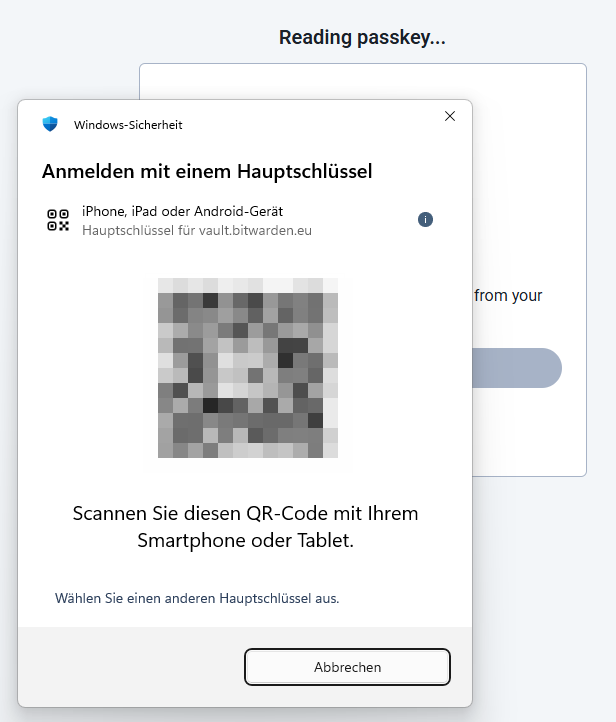
(as login-with-passkey is still Beta, it’s still only possible for the web vault - but the Chrome browser extensions are expected to follow)
PS: Actually, I’m not sure if that feature request should remain open or could be closed. 
Perhaps update your “deep freeze” file after having logged into your vault and locking it. This way, your computer and the Bitwarden cloud will continue to share the same “login with device” secret and since the vault is locked (as opposed to logged out), you might even be able to use biometrics.
Unfortunately, I need access to the main computer in order to update it, and that’s not possible. 