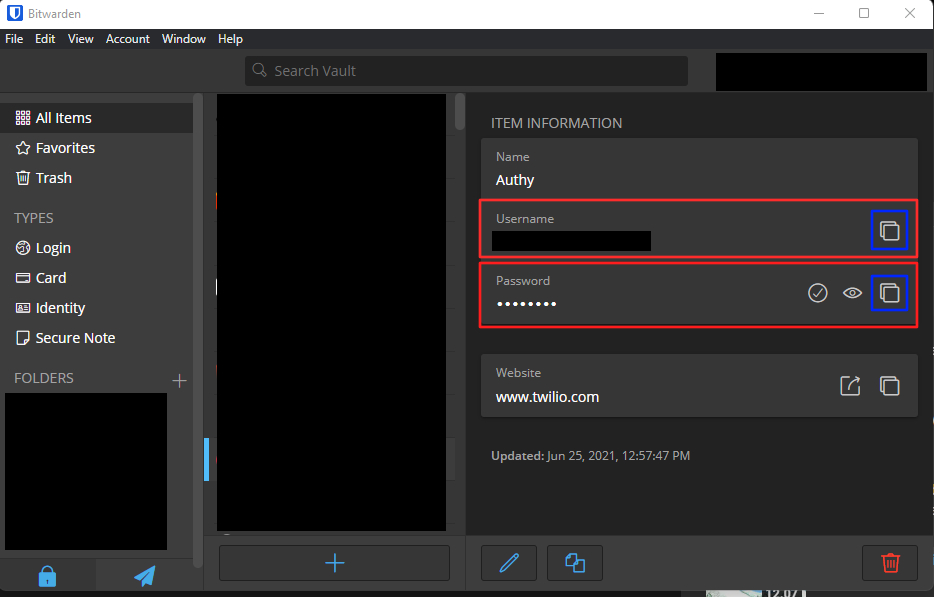
Copying login information could be easier. Instead of a small button, copying should be possible by clicking on the entire field.
1 Like
Feature name
- Make “copy to clipboard” function default for clicking entire row
Feature function
I’m migrating over from another password management app that I used on both Windows and Android.
In both cases, when I opened an item to view the credentials, I could simply click/tap anywhere on the row to have the data copied to the clipboard.
Currently, on the Bitwarden clients (both Android and Windows), I have to click/tap the tiny little copy icon to get the data.
It would be great if there was a way to enable this functionality. As far as I am aware, there is currently no function mapped to clicking on the data rows.
The main benefit of this is ease of copying the data stored in Bitwarden when it is needed.
1 Like
What client app are you using? In the browser extensions, clicking a vault item in the “Tab” view causes the credentials to be auto-filled (which is superior to copying).
1 Like
I typically use Android and Windows. I suppose you are right that I could use a browser extension, but the few times I tried to have Bitwarden auto-fill something, it completely failed to do anything… so the functionality isn’t great, at least not on Edge/Windows 11.
Also, I am often using credentials with apps, outside of browsers entirely. Bitwarden can’t handle these with an auto-fill.
Hey there, what issues were you bumping into with autofill on Edge? Did you disable your browsers native functionality to manage passwords? Deactivate My Browser's Built-in Password Manager | Bitwarden
Did these vault items have defined URIs? Forming URIs for Autofill | Bitwarden
Do you have a lot of brower extensions running at the same time?
Hi, i think it’s not the autofill option. I’ve the same “issue” coming from 1pass…
If you click in their app on an password-entry (not only the “copy password icon”) your password is copierd to clippboard. I think it’s a very handy feature.
 Currently clicking on the row creates an autofill event, regarding changing that to copy password, I think 1Password might be fine with this because they have an overlay pop-up that appears in the credential field without having to click in extension or use right click context menu, but let me know what you think.
1 Like
Yes, it’s just convenience. If you’re coming from another app, you have to learn some new “tricks”. Sometimes hard for old dogs 
1 Like
I’d like to simplify the copy/paste process because I often need to copy and paste many credentials. Instead of having to click the small “copy” button in the desktop app to copy a username, password, etc., it would be more convenient if clicking somewhere on the entire field automatically copied the value, similar to how it works in Proton or Keeper.
@Rei Welcome to the forum!
FYI, copy-paste is not a recommended method to transfer credentials, because it exposes your secrets to the system clipboard, which is vulnerable to leaking or theft of information.
However, if you click anywhere on the label of a field, you can drag the field contents into any input prompt that supports HTML5 (i.e., most modern websites), using Bitwarden’s drag-and-drop feature.
Is there a reason that you are not using Bitwarden’s browser extension, which offers a wide array of secure autofill functions?
&nsbp;
P.S. I changed your feature request title to be more descriptive (old title was: “Simplified Copy/Paste in Desktop App”; new title: “Copy field values by clicking anywhere in field when viewing item details”).
Hey @grb, thanks for the tip about drag-and-drop which is a really neat feature. I’m also using the browser extension, but the copy-paste simplification was mainly for applications that Bitwarden can’t autofill for me, like PuTTY instances, some game launchers, and a few others.
Is there a more secure way to handle this? (Aside from PuTTY, which can be addressed with SSH keys, etc.)
I don’t know if more secure, but probably more convenient - if you’re on Windows or MacOS, then “desktop auto-type” is in development. See this feature request: 🔜 Auto-type/Autofill for logging into other desktop apps (Windows, MacOS, Linux)