My 1st & second child have free/personal bitwarden accounts. I made an organization which I successfully shared with my 1st child. Much later I now have moved my second child onto bitwarden and want to add her to the same organization.
Now matter what I do it looks to me in my account as if she is a member with the right permissions (invite > accept > confirm. log out > log in). But in her account there is no organization shown, just her own vault.
What am I doing wrong?
(As far as I can tell ‘adding users to a family plan’ is a misleading concept. So long as I have a family plan I can share an organization with 6 others. They are in no way part of my subscription. If I’ve misunderstood this then I’m completely lost.)
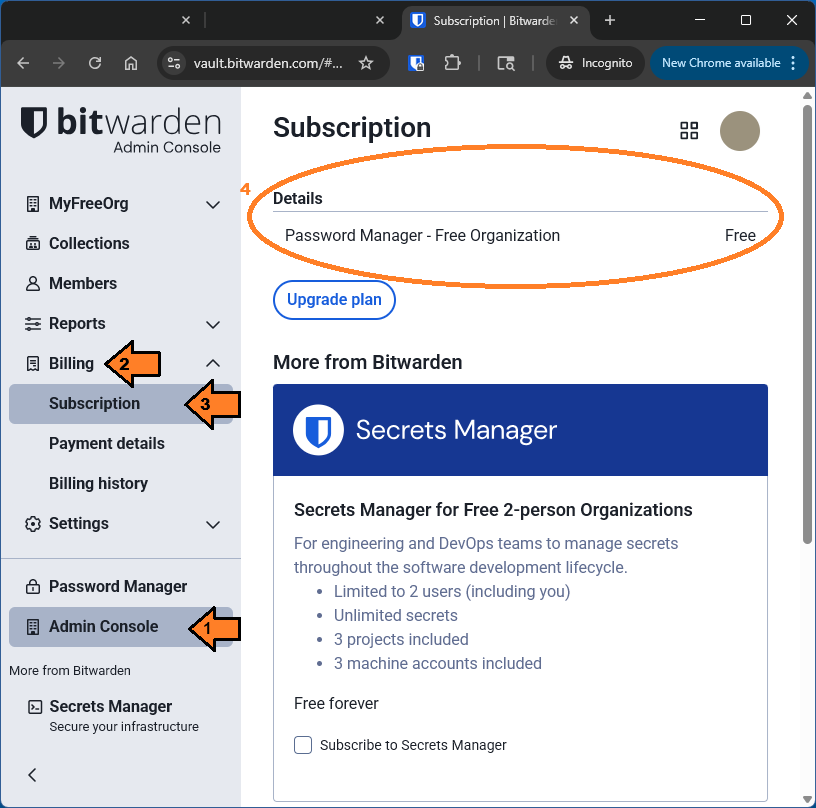
Please verify that the organization you created is in fact using the Family Plan subscription, and it not a Free organization. To check, log in to the Admin Console, and look under Billing > Subscription.
Only with five others. The sixth member is you.
Maybe I’ve misunderstood what you’re getting at, but members of a Family Plan organization do receive benefits from your Family Plan subscription, insofar as their individual accounts will have Premium privileges for as long as your Family Plan subscription remains active (and while they remain members of your Family organization).
Hi @grb. I’ve confirmed that I have a family subscription. I can’t find anywhere an indication that an organisation has a status of being ‘free’ or based on a paid plan. When I navigate to the page showing the organization (and shows my children as members) and its collections, there is no indication there that the organisation or collection belong to certain type of subscription.
This is the page that you need to look up. Log in to the Web Vault, then click on “Admin Console” (), “Billing” (), and “Subscription” () as shown in the screenshot below, and look in the section labeled “Details” ():
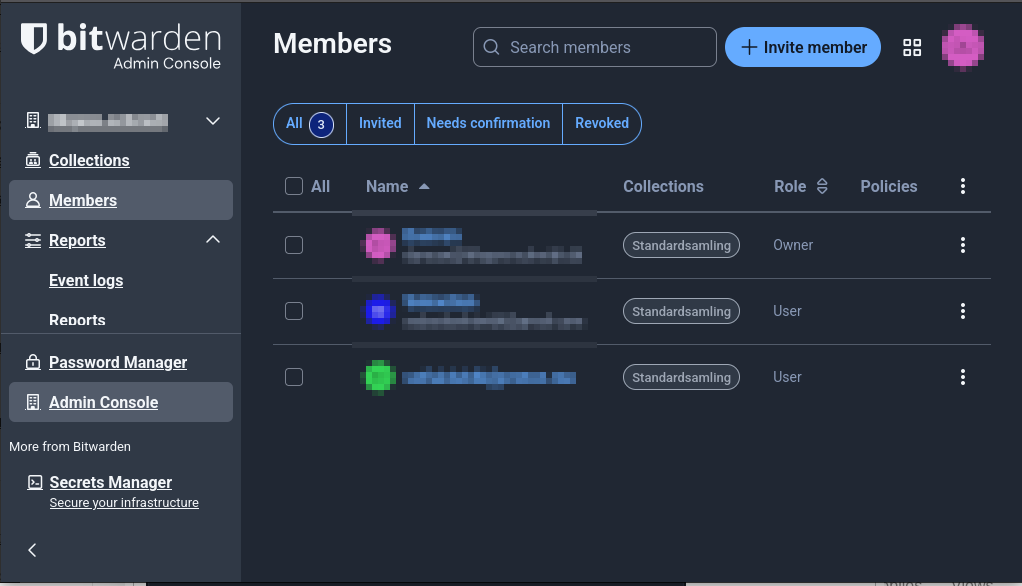
Thank you for confirming. I would like to confirm some more information about your setup. Please log in tot he Web Vault, go to the Admin Console, and click on Members (the third link from the top) in the side navigation bar.
If you are able, please take a screenshot of the Members screen, then use an image/photo editor to obscure all personal information that can be seen in the screenshot (especially the names and email addresses listed in the “Name” column of the member information table), and past the redacted screenshot into your forum response.
If you are not comfortable creating and posting a redacted screenshot, then please provide a detailed written description of what you can see in the Members screen (without revealing any personal info).
Finally, it would he very helpful if you could ask your second child to disclose what Bitwarden app she is using (Desktop app, Web Vault, Mobile app, or Browser extension), including the version number of the app or extension; in addition, it would be helpful to know what operating system (Windows, macOS, Linus, Android, or iOS) she is using, and what kind of browser she is using (if she is using a Bitwarden browser extension).
My daughter is using the official bitwarden app for android, whatever the latest version is in Google Play. I have used her credentials to log in using Firefox but it’s exactly the same, there is just no mention of an organization.
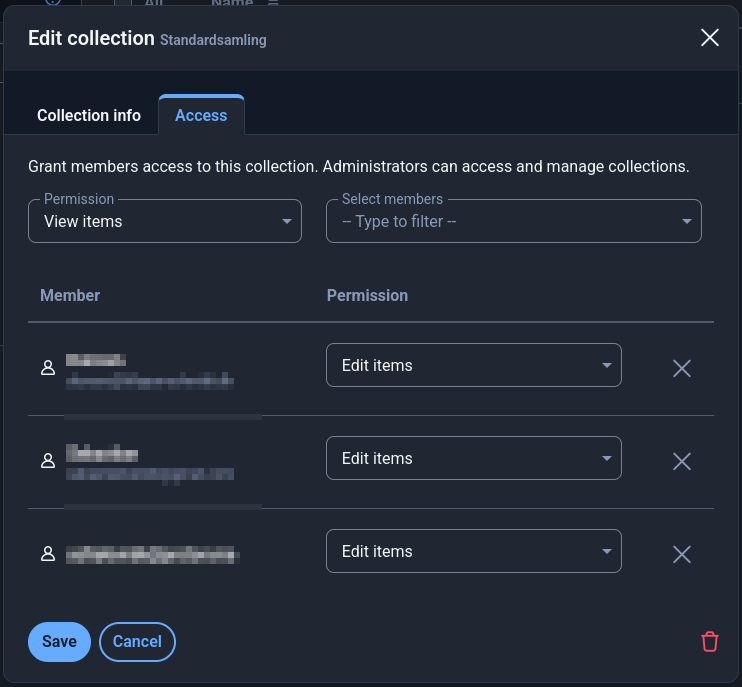
In both images my daughter is the lates/bottom entry on the list. She is in both cases only shown with an email address. The others are shown with both a name and an email address. I don’t know if that’s relevant and have not looked into why it is that way.
At this point, our troubleshooting will have to switch to looking at what is happening in your daughter’s Bitwarden apps. If you can use her credentials to log in to the Web Vault or into one of your Bitwarden apps or browser extensions, that will allow us to collect some additional information.
Please go ahead and do so, and let us know which app/extension/browser/OS you are using for these tests, including the Bitwarden version number.
In addition, please post a screenshot of the vault filters while logged in using her credentials, to show that only “My Vault” is visible. As before, please ensure that you have redacted any personal information before posting the screenshot.
Good catch! But I’m confused by the fact that you were able to register her as a member in your organization to begin with — I thought that this would not be possible for accounts that are not on the same server as the organization vault.
They can move a subscription to a different account. But as far as I know, you have to create the new account (in the correct region) yourself and move all data over yourself. (exporting from the current account → importing in the new account)
Use JSON or ZIP as the export format to not loose any data.
(JSON and ZIP exports don’t include Sends and items in the trash – JSON also doesn’t (!) include any attachments)
PS: And as I @grb I also wonder why her account was even displayed in your Admin Console [PS: though, for an invitation it would be okay to be shown - maybe?!]… and if the second and third step of adding the account (accepting and confirming) was indeed successful or not - or whether that already produced some kind of error message or not.
You both raise issues of which I certainly will make bitwardens staff aware. This really is a poor experience for what should be a straight-forward process.
Yeah… if all three steps were successful (Invitation → Accept → Confirmation), then I would consider this a bug, to be honest.
What I only now became aware of: the term “server region” (and that “sharing” via an organization is only possible with the same server region for all accounts) is not even mentioned in those two Help Sites:
Technically, the restriction is for the organization owner and all organization members to be hosted on the same server (which does not need to correspond to one of Bitwarden’s two geographic regions — it could also be a self-hosted server). The same restriction also exists for Emergency Access, but at least in that case, the requirement has been documented:
Trusted emergency contacts must be existing Bitwarden users, or must create a Bitwarden account before they can accept an invitation. Accounts must be on the same Bitwarden server.
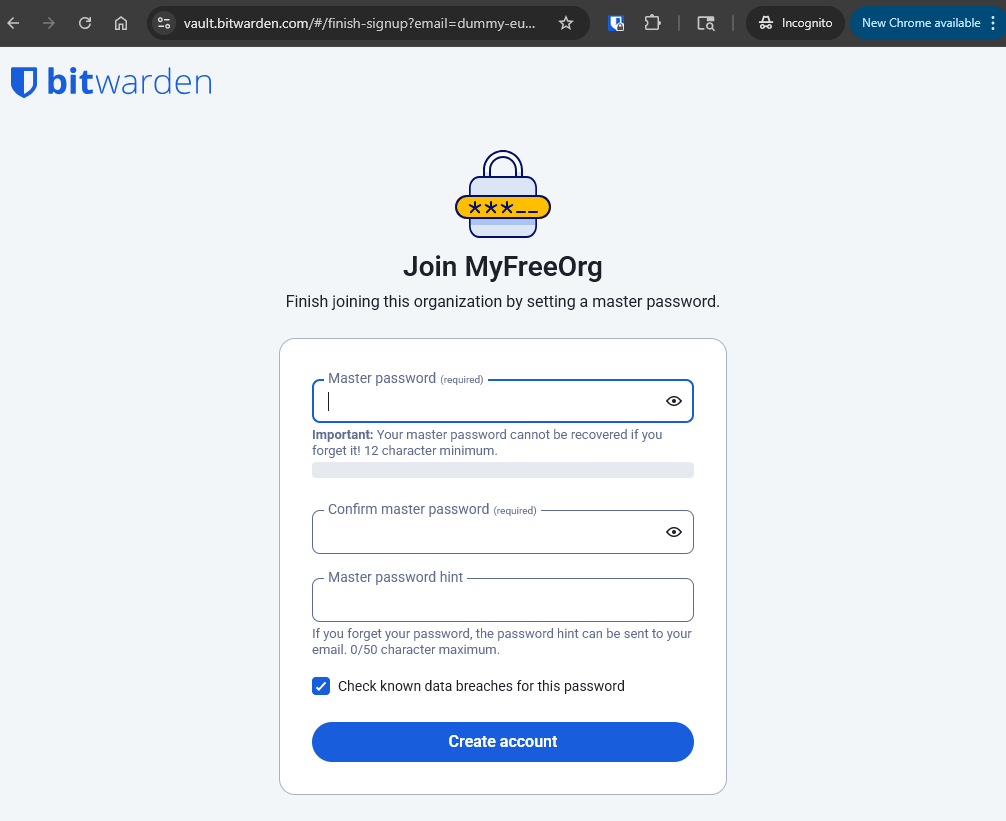
I think I’ve solved this mystery. I created a test account on the EU server, and invited it to join an organization on the US server. The “Accept Invitation” link in the invitation email redirects to the following page:
Note that the wording is “finish … by setting a master password” — not “… by confirming” your master password. Thus, accepting the invitation by entering a master password on the “Join” page creates a new account on the US server (which is completely divorced from the existing account on the EU server).
@circinate this means that your daughter most likely has two Bitwarden accounts now — one on the US server (bitwarden.com) and one on the EU server (bitwarden.eu). It is likely that she entered her EU account master password when accepting the invitation, so both of the accounts should be using the same email address and the same master password for logging in. Once you have got the organization set up the way that you want it, it would be a good idea to delete your daughter’s account on the US server (bitwarden.com).
@grb you are totally correct. I have logged into her account on the .com server. Indeed it has access to the organization I set up to share with her.
This really is an UX nightmare. If someone out there has influence it would be good to make some improvement. The working must be much clearer and more prominent.
An invitation to a known email address should be something like a link to log into your account and accept the invitation - not all done via email.
An invitation to an unknown user should be something like a link to a page about bitwarden and what an organization is, and how to verify the invitation is authentic and create an account. I am very concerned that a well crafted fake invitation to an organization might be able to steal credentials from existing bitwarden users.
@grb you understand bitwarden better than I do. Is it possible you would like to follow this up as an RFE and/or bug? The bug part would be that she can appear to be a member of an organization without ever viewing the organization.
Also the title of this thread is now very misleading, but I see no way to change that.
I changed the topic title to “Confusing experience adding organization user [SOLVED: server region mismatch]” (old title was: “Adding free/personal users to an organization?”).
In my experience, something like this would not be considered a bug (i.e., if an Issue report is opened on Github, it is likely to be closed.
The best course of action would be to open a Feature Request. In addition, it would probably be a good idea to use the “Suggest changes” link found at the bottom of the Help Center pages to propose better documentation of the current behavior in the appropriate Help article (perhaps this one: User Management | Bitwarden).
 ), “Billing” (
 ), and “Subscription” (
 ) as shown in the screenshot below, and look in the section labeled “Details” (
 ):
):