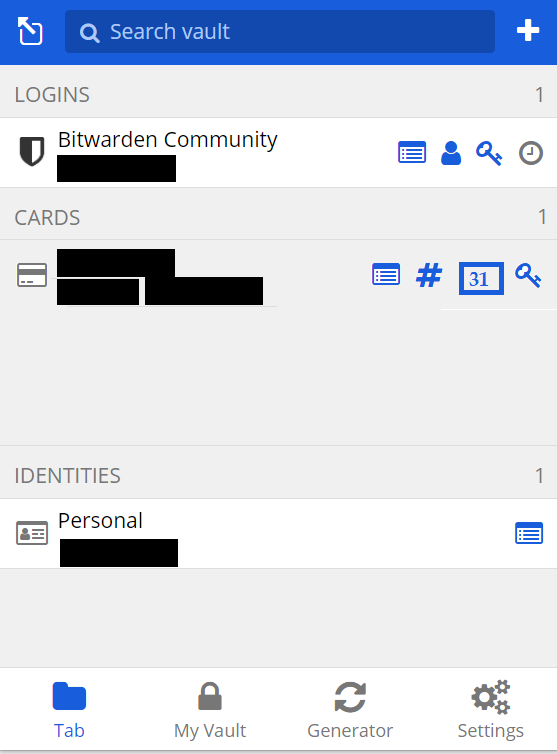
We can copy and paste card number and card security pin but NOT card expiry date from the browser extension

Please can this be implemented as below (the box with 31 was added by me)
Thanks
We can copy and paste card number and card security pin but NOT card expiry date from the browser extension
Please can this be implemented as below (the box with 31 was added by me)
Thanks
Hi!
I was looking for a good first issue to tackle and this seems like something that is up my alley.
I can imagine this decision was made due to the fact that Credit Card number and CVC fields both are quite consistent in the fact you can copy and paste to them. Date fields are often a little tricker in my mind. Currently you can see the expiration date by pressing on the left-most view button and then fill in the expiration date by hand.
What do other people think of this, is a copy paste button for the expiration date also desirable? Or is the quick view button already sufficient?
Cheers,
Jip
Please add a “copy-to-buffer” button to the owner field, similar to the credit card number field. It’ll make copypasting credit card info much easier
I’m sorry, it will be a lazy feature request but a simple one.
Card autofill sometimes doesn’t work, especially when I use it from mobile app and pasting it into another app. For that copying the “Cardholder name” would be a great feature. Also copying the year and month could be an additional one.
My current workaround is adding a custom field which also stores the cardholder name.
Thanks.
Yes, please. Copy/paste is something I would use frequently.
I’d like to be able to copy the card holder name as well.
However i see this request has failed to generate much traction, am keen to implement this feature myself if anything would be kind enough to give me some pointers.
Hey @Wong and welcome to the community,
Thanks for taking the interest in possibly making an attempt to add this feature.
You can check out the below docs for information to help contribute to the Bitwarden software.
It’s the awesome open-source community that really helps make this product so great IMO. I would recommend also reaching out to the team and try to possibly work with them on your PR.
Once you create something the team would add this to their internal review process, QA, etc. for it to possibly be merged.
Hope that info helps 
Hi Devs and community,
I use the card type a lot for online purchases and it would be a real quality of life improvement for at least the “Cardholder name” field to have a quick copy button similar to the “Number” field.
Hopefully this is one of those things that is relatively easy to implement.
I’ve highlighted the relevant fields below. Tested on both (current) chrome web app and android app.
Thanks!
It would be nice to have this feature implemented. I also need it. Thanks!
This really should be added as part of the UI update
Would like this button adding as well as card autofill isn’t perfect - then again, it never is. Google card autofill often fails as well. On the Windows client, you can at least highlight, copy & paste.
FYI, In the current browser extension, all card details can be copied by drag & drop.
In the desktop app on Windows, you still cannot copy the cardholder name (there is a copy button for card number and security code but not name) - such a tiny change but would be very useful to have this added, please.
Note: I changed the title of this feature request from Ability to copy cardholder and expiry date to Cards: Add quick copy buttons and copy buttons (in item details) for cardholder name and expiry date.
One reason: the sheer ability to copy those is already there – with drag & drop it might even be easier in some situations than to use the copy buttons (though, it’s only possible from the item view):

[Post-Edit: after @TheBestPessimist’s response, I added the link for drag & drop autofill in the Help Sites, as it’s also explained there.]
A very important note which was not obvious nor intuitive to me: I have to drag and drop THE ENTRY TITLE and not the value itself (which does text selection instead).
Ie for the entry
Cardholder name
The Best Pessimist
I have to put my mouse on Cardholder name and drag and drop that, and NOT on The Best Pessimist.
Until i saw your video @Nail1684, i did not realise this.
@dwbit could you maybe make my explanation a bit more explicit in the docs linked in Nail’s post above?
I would add: in that link, it maybe indeed could be made more clear, that it works like that for all login items vault item types (though, I’m not sure right now if there are some fields that can’t be dragged).
And on the other hand, here it could be made more clear, that drag & drop is another option with the browser extension…
Notably (and inexplicably), the ability to drag-and-drop the “Website (URI)” fields was lost over a year ago, and has still not been restored: