@Wammel Welcome to the forum!
There will be an opt-out “option”.
@Wammel Welcome to the forum!
There will be an opt-out “option”.
Thanks for your reply. That is awesome! I wish more services would offer that option.
Yes, the notices will stop when the feature is released.
Is the opt out option already working? How can I do that?
There’s nothing to opt out of yet, as the New Device Verification feature has not yet been released.
Hey everyone, just a reminder that if you prefer not to use email verification, you can instead enable any of the available two-step login methods such as authenticator app, or hardware key, more info above.
To prevent your account from being vulnerable to various types of attacks, it’s strongly recommended to keep two-step login enabled.
To be fair, the risk analysis requires understanding both of these concerns:
There are two primary risks to one’s vault: risk of disclosure, and risk of loss. Opt-out increases the risk of disclosure, which is the concern hilighted by @Micah_Edelblut. Opt-in increases the risk that one will lock themselves out of their vault, which is the concern hilighted by @ukandy. This is the basis of the conflict here. Those strongly advocating for either position are prioritizing one of these risks with little concern for the other.
Ideally, one would minimize both risks, not just pick one of opt-in or opt-out. Here are a few strategies for minimizing risk:
Because risk acceptance is an individual thing, our true job is to ensure the person accepting the risk (typically the vault owner) has considered both risk scenarios, including their likelihood, impact, and mitigations. Our job is one of education, not to do somebody else’s risk-acceptance.
Personally, I have done all 5, So opt-in vs opt-out is pretty much irrelevant to me. My goal is to never get to the point where I depend upon that setting.
The way I see it, the New Device Verification is there to strongly encourage the use of 2FA. Therefore, in my opinion, the best strategy is to both enable 2FA and opt out of New Device Verification; in addition, record your 2FA reset code in a securely stored Security Readiness Kit (emergency sheet). This approach provides all the benefits of New Device Verification, while preventing the risk of lock-out if there is a snafu when using the 2FA reset code.
Furthermore, enabling passkey login for your account is supposedly going to waive the New Device Verification requirement, although the details of this remain unclear (will the New Device Verification only be by-passed when actually logging in using the passkey, or will New Device Verification requirement be waived for all apps and devices when one has enabled passkey login for the Web Vault?). If the mere enabling of passkey login for the Web Vault disables New Device Verification on all devices, then this would be an alternative to opting out (i.e., my recommendation would be to enable 2FA and enable passkey login).
Does this mean that the New Device Verification feature is now in force?
If one opts out, is there a mechanism for opting back in, and if so, where?
Hey @grb,
EDIT: Regarding passkeys, this is per log in attempt.
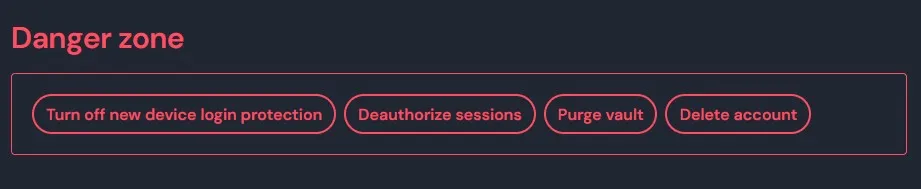
Great! I like that enabling and disabling are both done from the “Danger Zone”, since (as @DenBesten pointed out), there are significant risks associated with both opt-out and opt-in… 
How can Bitwarden have such an improvised UX?
The latest update in Android still includes language which makes no mention the possibility of opting out. But much worse, it does not give a reasonable option to users who have already opted out. I can not take a screenshot, but current options upon login include:
Users need to select one of those 3 options to access their vault, even if they already opted out. This dialog is unskipable and you are locked out of your vault in Android if you do not select one of those options, which shows how much thought has gone into every step of this ridiculous implementation.
BitWarden has done a great job so far in creating a very reliable and effective product with continually expanding features and improved usability.
BUT this new requirement is being poorly implemented and really poorly communicated. As an IT consultant I have encouraged several organizations to adopt BW as a comprehensive “all-in-one” PW management solution. But the notifications around this have caused confusion and the process required here of expecting users to adopt yet another tool in order to be able to use BW is certainly going to lead to lock-outs and data loss by “average” non-technical users.
Forcing a specific “February” adoption deadline when the range of options are not yet fully available is really a big communications mistake.
You guys are extremely talented – you must be able to come up with a way to incorporate BitWarden 2FA login, directly into the BitWarden mobile app, without going to a third-party app (including BW Authenticator).
Please change the login messaging right away – before the end of Feb. – to make it clear that this is an optional security feature.
Hi everyone, to cut down on misinformation, some posts have been removed. New Device Login Protection has not been rolled out yet, however the ability to opt out has (which is not recommended due to the decreased security/susceptibility to cyberattacks, more on this here: New Device Login Protection (February / March 2025) | Bitwarden)
Instead of rebating if they are wrong, you remove their posts, while still ignoring legitimate concerns. There is no reasonable UX for users who opted out, they are still, very intrusively asked to enable 2FA when they already assertively indicated the opposite.
I also suspect that this is intentional. Because they know better than us.
Also, has anyone clarified what will happen to users who have not logged in during the last month? Will they effectively be locked out of their account if they are unable to perform the imposed 2FA? I suspect this can be the outcome, given how intrusively they are trying to force 2FA on everyone.
This may be why the release of the feature appears to be delayed until March-ish now.
And regardless:
The warnings may be intrusive, but they are there precisely to minimize inconveniences due to account lock-out when the feature is rolled out.
Hi everyone, we’ve heard the feedback on the messaging, and are making improvements to the prompt to avoid the appearance of a lock out (there is no lock out, you can currently click through to access your account).
Thanks for your patience, and stay tuned!
Any update on the New Device Verification feature release date (which is when the notifications are supposed to stop altogether)?